
Managing construction crews and field service teams is rarely straightforward. Schedules change without notice, job sites shift, workers operate across locations, and communication gaps can quickly turn into costly delays. Traditional office-first tools often fail in these environments because they assume employees sit behind desks with constant access to email or desktop software. This is where Connecteam positions itself differently.
It is designed as a mobile-first workforce management platform. Connecteam focuses on deskless teams—construction workers, cleaning crews, retail staff, hospitality teams, and field technicians. Instead of forcing field employees to adapt to rigid systems, it brings scheduling, time tracking, communication, and HR tools into a single, easy-to-use mobile app.
In this detailed Connecteam review, we’ll explore how well the platform actually works for construction and field service businesses, where it shines, where it falls short, and whether its pricing justifies the value. If you’re evaluating workforce software for on-site teams, this review will give you a clear, realistic picture.
What Is Connecteam?
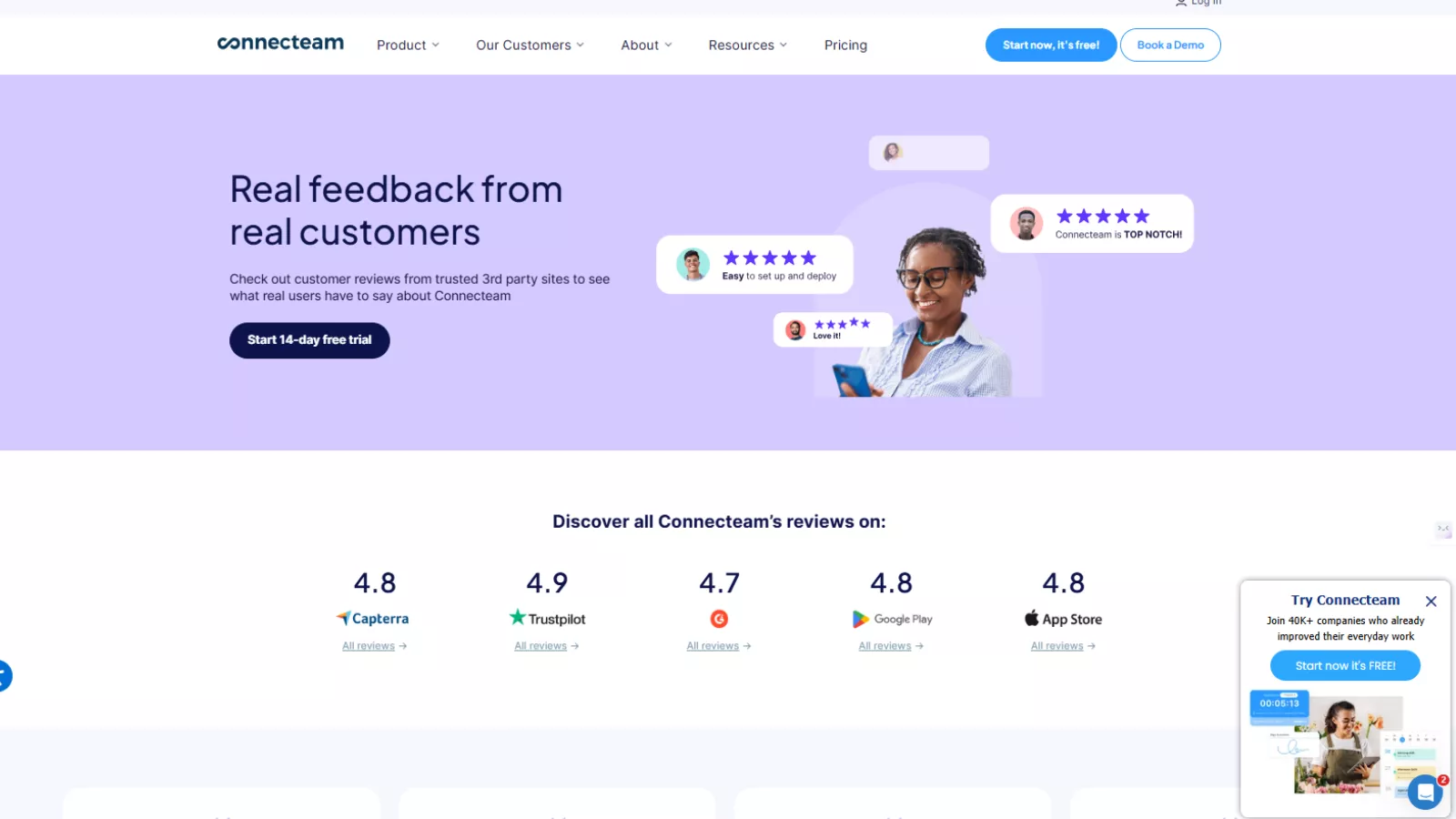 Connecteam is an all-in-one employee management platform built specifically for businesses with mobile, remote, or deskless workforces. Unlike traditional HR or project management tools that cater to office environments, Connecteam prioritizes on-the-ground execution.
Construction companies use Connecteam to:
- Track employee hours with GPS verification
- Manage shift schedules across multiple job sites
- Assign tasks and monitor completion
- Communicate instantly with crews in the field
- Handle onboarding, training, and basic HR workflows
The platform is available on iOS, Android, and web, but its real strength lies in its mobile app, which is where most field workers interact with it daily.
Why Connecteam Works Well for Construction & Field Teams?
Construction and field service environments have unique challenges:
- Workers rarely check email
- Job locations change frequently
- Time theft and buddy punching are real concerns
- Paper-based processes slow everything down
Connecteam addresses these issues by centralizing daily operations into one app that employees can actually use without training.
Rather than replacing every enterprise system, Connecteam aims to simplify day-to-day workforce coordination, which is exactly what many field teams need.
Core Features Explained (From a Field Team Perspective)
Time Tracking With GPS & Geofencing
Time tracking is one of Connecteam’s strongest features, especially for construction businesses managing multiple job sites.
Employees can clock in and out directly from their phones. Each entry includes:
- Time stamps
- GPS location
- Optional geofence validation
Geofencing ensures workers can only clock in when they’re physically present at approved locations. This significantly reduces time fraud and eliminates guesswork during payroll processing.
Managers get access to detailed timesheets that show where and when hours were logged, making audits and approvals far easier.
For construction firms dealing with hourly labor and compliance requirements, this alone can save hours each week.
Smart Scheduling for Job-Based Work
Scheduling in construction isn’t static. Crews change, shifts extend, and last-minute adjustments are common.
Connecteam’s scheduling tool allows managers to:
- Create one-time or recurring shifts
- Assign employees to specific job sites
- Set shift instructions and notes
- Notify workers instantly of schedule changes
Employees can also request shift swaps, claim open shifts, and submit availability—all from the app. This removes the back-and-forth phone calls and text chains that often slow down field operations.
The drag-and-drop scheduler is intuitive, even for managers who aren’t tech-savvy.
Task Management That Fits Field Workflows
Construction tasks are rarely abstract—they’re visual, location-based, and time-sensitive.
Connecteam’s task management system lets managers:
- Assign tasks with clear instructions
- Set deadlines and priorities
- Attach photos, documents, or checklists
- Break large jobs into smaller subtasks
Field workers can update task status, upload images of completed work, and add comments directly from the job site. This creates accountability without micromanagement.
For supervisors, it offers visibility into progress without needing to be physically present at every location.
In-App Communication Built for Crews
Communication gaps are one of the biggest pain points in construction environments. Important updates get lost in WhatsApp groups, SMS threads, or missed calls.
Connecteam centralizes communication through:
- Company-wide announcements
- Team or project-based group chats
- One-on-one direct messaging
Managers can ensure safety updates, policy changes, or urgent instructions reach everyone instantly. Unlike email, messages are far more likely to be seen by field workers who rely on mobile devices.
Additional tools like surveys and polls help gather feedback or confirm understanding without formal meetings.
HR, Training & Employee Engagement Tools
While Connecteam isn’t a full HRIS, it does cover essential HR needs for growing construction teams.
Key tools include:
- Digital onboarding checklists
- Training modules with quizzes
- Policy acknowledgment forms
- Recognition and reward programs
New hires can complete training directly from their phones, ensuring consistency across sites. Managers can track completion and compliance without paperwork.
Small touches like work anniversaries and recognition notifications also help improve morale—something often overlooked in labor-intensive industries.
Ease of Use: A Major Advantage
One of Connecteam’s biggest strengths is its simplicity.
The interface is clean, intuitive, and requires minimal onboarding. Even workers with limited technical experience can navigate the app comfortably within minutes.
For construction companies with high turnover or seasonal labor, this ease of use is critical. Less training means faster adoption and fewer operational disruptions.
Connecteam Pricing Breakdown
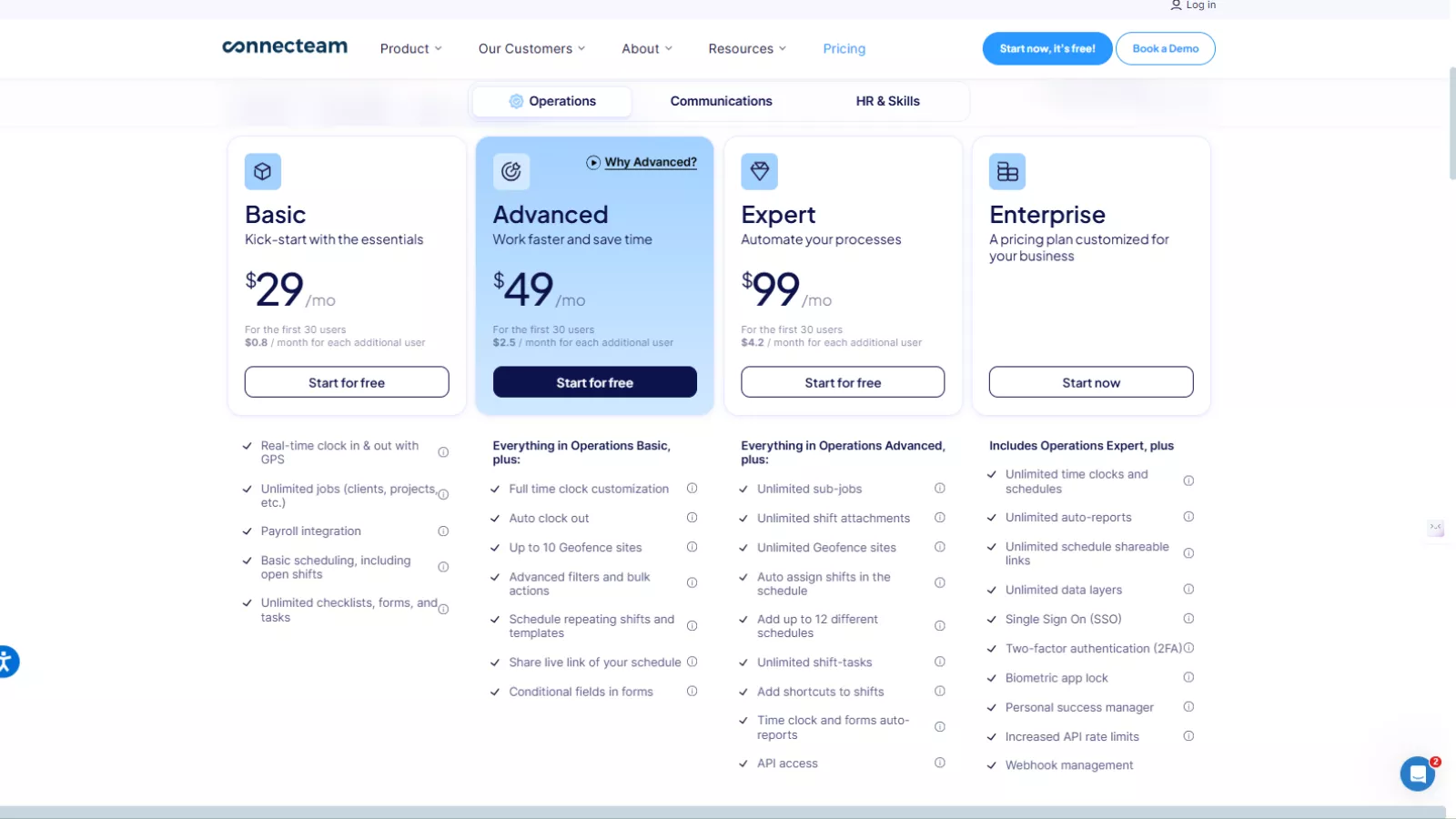
Connecteam pricing is structured to be accessible for small and mid-sized teams, with costs scaling based on features and user count.
Basic Plan – $29/month
Best for small teams that need essential workforce tracking without complexity.
The Basic plan covers core operational needs like GPS-based clock-in and clock-out, basic job and project tracking, payroll integrations, and simple shift scheduling. You also get unlimited checklists, forms, and tasks, which works well for daily site check-ins and routine job reporting. However, it lacks automation and advanced scheduling controls, making it suitable mainly for straightforward operations.
Ideal for: Small construction crews or service teams just getting started with digital workforce management.
Advanced Plan – $49/month
Designed for growing teams that need better control and flexibility.
This plan builds on Basic by adding clock-out automation, schedule templates, recurring shifts, and advanced filters for bulk actions. It also introduces geofencing (up to 10 locations), making it easier to ensure employees clock in only from approved job sites. Advanced scheduling and form customization help reduce manual admin work significantly.
Ideal for: Field teams managing multiple job sites or rotating schedules.
Expert Plan – $99/month
Built for businesses that want automation, reporting, and scalability.
The Expert plan removes most limitations by offering unlimited geofencing sites, advanced auto-reports, live GPS tracking, API access, and complex scheduling logic. It allows managers to automate recurring processes and gain deeper insights into workforce activity across locations. This plan is well-suited for companies that rely heavily on data-driven decisions.
Ideal for: Mid-sized construction and field service businesses with active workforce oversight needs.
Enterprise Plan – Custom Pricing
Tailored for large organizations with advanced security and integration needs.
Enterprise includes everything from the Expert plan plus enterprise-grade features such as single sign-on (SSO), two-factor authentication, biometric app locks, higher API limits, webhooks, and a dedicated success manager. It’s designed for organizations that require strict security, custom workflows, and ongoing support.
Ideal for: Large construction firms or enterprises with complex operational structures.
What About Communications & HR & Skills?
It’s important to note that Connecteam pricing applies per hub.
- Communications Hub focuses on company updates, chats, directories, surveys, and employee engagement tools.
- HR & Skills Hub includes onboarding, training courses, document management, time-off tracking, and recognition programs.
Each hub follows a similar pricing structure, meaning you only pay for the areas your business actually needs. This modular approach helps construction and field service companies avoid paying for unnecessary features.
Pros and Cons of Connecteam
Pros
- Designed specifically for deskless and field teams
- Excellent GPS-based time tracking
- Easy-to-use mobile app
- Affordable pricing for small and mid-sized teams
- All-in-one platform reduces tool sprawl
Cons
- Requires reliable internet connectivity
- Advanced features locked behind higher tiers
- Limited customization for complex workflows
- Fewer third-party integrations compared to enterprise tools
Real User Feedback (What Teams Actually Say)
Many construction and field service managers highlight the same strengths repeatedly.
“Clock-ins with GPS removed payroll disputes completely for us.”
“Our crews actually use it, which wasn’t the case with previous tools.”
“Scheduling across multiple job sites became much easier.”
Criticism usually focuses on customization limits and integration depth, especially for larger organizations with established tech stacks.
Who Should Use Connecteam?
Connecteam is best suited for:
- Construction companies with mobile crews
- Field service businesses managing multiple locations
- Cleaning, maintenance, and repair teams
- Retail and hospitality operations with shift-based work
It may not be ideal for:
- Large enterprises requiring deep ERP integrations
- Businesses with highly customized workflows
- Teams operating in areas with poor internet access
Connecteam Alternatives (One-Line Each)
If you’re comparing options, here are five Connecteam alternative tools worth considering:
- EmpMonitor – Strong employee monitoring and productivity tracking for field and remote teams
- Deputy – Shift scheduling and workforce management for hourly workers
- When I Work – Simple scheduling and attendance tracking for small teams
- QuickBooks Time – Time tracking with payroll integration
- Unolo – Field force management with location tracking and task reporting
Each alternative has strengths, but Connecteam remains one of the most balanced tools for construction-focused use cases.
Final Verdict: Is Connecteam Worth It?
Connecteam doesn’t try to be everything—and that’s exactly why it works.
For construction and field service businesses, it delivers what matters most: visibility, accountability, and communication, all wrapped in a mobile-first experience that crews actually use.
While it may lack deep customization or enterprise-level integrations, its ease of use, practical feature set, and reasonable pricing make it a strong choice for small to mid-sized field teams.
If your priority is simplifying daily operations rather than managing complex enterprise workflows, Connecteam is absolutely worth considering.
Frequently Asked Questions About Connecteam
Can Connecteam work offline in low-network areas?
Connecteam has limited offline functionality. Most features, including GPS time tracking and real-time updates, require an active internet connection to sync data accurately.
Does Connecteam track employees outside working hours?
No. Connecteam only tracks location data during active clock-ins or when specific features like GPS tracking are enabled during work hours.
Is Connecteam suitable for companies with multiple business locations?
Yes. Connecteam supports multi-location workforce management, but advanced location controls like unlimited geofencing are only available in higher-tier plans.
Can employees use Connecteam without company-issued devices?
Yes. Employees can install the Connecteam app on their personal smartphones, which makes it easy for deskless and field teams to get started without extra hardware costs.